Download Developing in Agentic AI Systems.GH-600.ExamTopics.2026-10-11.58q.vcex
| Vendor: | Microsoft |
| Exam Code: | GH-600 |
| Exam Name: | Developing in Agentic AI Systems |
| Date: | Oct 11, 2026 |
| File Size: | 3 MB |
How to open VCEX files?
Files with VCEX extension can be opened by ProfExam Simulator.
Discount: 20%

Demo Questions
Question 1
You have a GitHub repository that uses GitHub Copilot code review on pull requests.
You plan to add repository-wide code review guidance that will apply to all files.
You need Copilot code review to consistently apply the guidance during pull request reviews.
What should you do?
- Modify the .github/pull_request_template.md file.
- Update the instructions in the .github/agents/*.agent.md files.
- Create a .github/instructions/copilot.instructions.md file.
- Create a .github/copilot-instructions.md file.
Correct answer: C
Question 2
You have a GitHub Enterprise repository that uses the GitHub Copilot coding agent and opens draft pull requests for assigned issues.
Evaluation results show that the agent repeatedly opens pull requests that modify .github/workflows/*.yml to bypass failing checks instead of fixing the underlying code.
You need to ensure that the agent fixes the underlying code instead of bypassing the failing checks.
What should you do?
- Start the GitHub Copilot CLI by using --allow-all.
- Update .github/copilot-instructions.md.
- Create a branch ruleset.
- Disable GitHub Actions workflows for pull requests created by the agent.
Correct answer: C
Question 3
You use a GitHub Actions workflow to orchestrate a multi-agent draft-review process for pull requests. The workflow uploads a single combined review-package artifact at the end of each run.
You discover that the review-package artifact is occasionally missing from the workflow run history, and you suspect that a user deleted it.
You need to identify which user manually deleted a workflow run artifact and when the deletion occurred.
What should you use?
- the checks.delete_logs audit log event
- the pull request description and comment history
- the merge commit history
- the artifact.destroy audit log event
Correct answer: D
Question 4
You have a GitHub Enterprise Cloud Organization that uses the GitHub Copilot coding agent.
Copilot creates a draft pull request for an assigned issue, and the pull request timeline shows Copilot started work.
After 70 minutes, the agent session log stops updating, and the pull request body status stops changing.
You need to restart the agent so that it continues the task from the issue context and produces new commits to the existing draft pull request.
What should you do?
- Wait for the agent to complete.
- Merge the draft pull request and mention @copilot on the merged pull request.
- Unassign the issue from Copilot, and then reassign the issue to Copilot.
- Select Approve and run workflows in the pull request merge box.
Correct answer: C
Question 5
You have a GitHub Enterprise Cloud Organization that uses a custom coding agent to run GitHub Actions workflows that create branches, open pull requests, and merge changes after required checks pass.
You need to log all agent-initiated actions and ensure that the logs are retained for two years.
What should you do?
- Configure audit log retention.
- Enable log forwarding.
- Enable Git events in the audit log.
- Configure audit log streaming to Azure Event Hubs.
Correct answer: D
Question 6
You have multiple GitHub Copilot coding agents that run tasks concurrently.
You live stream the session log output and see the following.
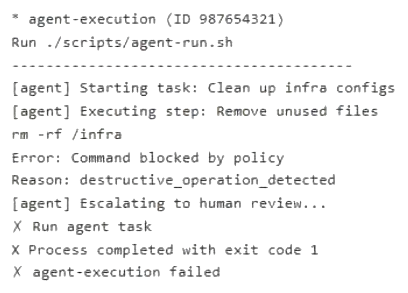
What is a possible cause of the error?
- a postToolUse hook
- a GitHub app installation policy
- a preToolUse hook
- a Copilot firewall policy
Correct answer: C
Question 7
You are analyzing the following agent logs.

You need to classify the error in a report for your company's CTO.
How should you classify the error?
- Context Issue
- Reasoning error
- Tool misuse
- Network issue
Correct answer: C
Question 8
You have multiple GitHub Copilot coding agents that run tasks concurrently.
You are monitoring the agents from the terminal by using the GitHub CLI.
An agent appears stalled.
You need to live stream the session log output.
What should you do?
- Run gh agent-task view and specify the --log and --jq parameters.
- Run gh agent-task view and specify the --log and --follow parameters.
- Run gh agent-task list and specify the --web parameter.
- Run gh agent-task list and specify the --status and --jq parameters.
Correct answer: B
Question 9
You have a GitHub Copilot coding agent that has completed a pull request for a security fix in your repository.
Before merging, you need to evaluate the quality of the agent's work by using both automated evaluation signals and human review.
You review the session log and the pull request.
What are two automated evaluation signals generated by the coding agent's built-in scanning tools? Each correct answer presents a complete solution.
NOTE: Each correct selection is worth one point.
- linting errors from the repository's CI pipeline configured in GitHub Actions
- comments from Copilot code review that suggest improvements to code patterns
- the detection of hardcoded secrets, such as API keys and tokens
- the median time to merge metric reported on the Copilot usage metrics dashboard
- CodeQL findings that identify security vulnerabilities in the generated code
Correct answer: C, E
Question 10
You have a GitHub Enterprise repository that runs an autonomous agent by using a GitHub Actions workflow. The workflow has the following jobs: agent-run that generates trace.json and plan.md review that waits for human approval before continuing deploy that uses the outputs from agent-run
You need to make the files inspectable in the GitHub Actions UI and ensure that the files are available to the review and deploy jobs.
What should you do in the workflow?
- Use dependency caching to store trace.json and plan.md.
- Upload trace.json and plan.md as workflow artifacts in agent-run, and download the files inside the jobs.
- Commit trace.json and plan.md back to the repository from agent-run.
- Store trace.json and plan.md on a network share and have later jobs retrieve them from the share.
Correct answer: B
HOW TO OPEN VCE FILES
Use VCE Exam Simulator to open VCE files
HOW TO OPEN VCEX AND EXAM FILES
Use ProfExam Simulator to open VCEX and EXAM files
ProfExam at a 20% markdown
You have the opportunity to purchase ProfExam at a 20% reduced price
Get Now!